March 19, 2014
Rectangle Collisions
Before we can safely make our entities move, we need a way to make them stop. To accomplish this goal, the next thing to implement is a collision system. There are a few considerations to make, such as what types of collisions our collision system should support and what shapes we will use. The collision system for this engine will support a number of collision types and at least circles and rectangles for shapes.
To begin with, I will implement a rectangle-based collision system with two collision types. First, a static collision type for collidable entities that ignore other entities (for example, the ground or moving platforms). Second, a solid collision type for regular entities that can be moved due to collisions (for example, the player). There are three steps to the collision system’s update cycle: collision detection, position resolution, and physics modification.
Collision Detection
The first step in a collision system is the detection of collisions. Collisions will happen as a result of movement, so this system will run after the physical system as updated the positions of every movable entity. All this step does is determine whether a collision has occurred.
In general, the detection phase can be decomposed into two parts. The first part quickly determines whether a collision is possible at all by throwing out pairs of entities that obviously don’t collide, and the second part more carefully compares collision shapes to decide whether there actually was a collision. For rectangle collisions, however, this can all be done in one step, as the quick detection is done using bounding boxes.
The Collider component will have a CGRect of its size and a CGPoint of its offset compared to the position of its entity’s Transform component. That way, what an entity looks like (the renderable component) has nothing to do with how it collides with anything. This allows us to have a bounding box smaller than the actual Sprite.
As I mentioned before in my high level design of systems, the update method of the collision system will attempt to detect and resolve collisions between every pair of collidable entities. In the method that detects and resolves collisions between two entities, I use a simple bounding box method that checks if one entity’s bounding box is outside the bounding box of the other.
- (void)resolveCollisionsBetween:(LGEntity *)a and:(LGEntity *)b
{
	LGTransform *transformA = [a componentOfType:[LGTransform class]];
	LGTransform *transformB = [b componentOfType:[LGTransform class]];

	LGCollider *colliderA = [a componentOfType:[LGCollider class]];
	LGCollider *colliderB = [b componentOfType:[LGCollider class]];

	CGPoint colliderPositionA = [self translate:[transformA position] by:[colliderA offset]];
	CGPoint colliderPositionB = [self translate:[transformB position] by:[colliderB offset]];

	CGPoint colliderPrevPositionA = [self translate:[transformA prevPosition] by:[colliderA offset]];
	CGPoint colliderPrevPositionB = [self translate:[transformB prevPosition] by:[colliderB offset]];

	BOOL outsideLeft	= colliderPositionA.x > colliderPositionB.x + [colliderB size].width;
	BOOL outsideRight	= colliderPositionA.x + [colliderA size].width < colliderPositionB.x;
 	BOOL outsideTop		= colliderPositionA.y > colliderPositionB.y + [colliderB size].height;
	BOOL outsideBottom	= colliderPositionA.y + [colliderA size].height < colliderPositionB.y;

	if(!outsideLeft && !outsideRight && !outsideTop && !outsideBottom)
	{
		// Collision detected here; proceed to resolve it.
	}
}
Position Resolution
The second step in the collision system is to resolve the collision by moving one of the entities outside of the other's collision shape. In this case, we want to move the first entity outside of the second entity's bounding box. The approach we will use to resolve this collision is to determine which axis has the smallest overlap and to resolve the collision along that axis alone (see this tutorial on determining the axis of smallest overlap and what it calls the projection vector).
Before we move an entity back, though, we need to determine which entity to move. Unlike a more sequential approach, where each entity takes a turn to move, collide with entities, then update, the entity component system approach moves everything before checking for collisions. To decide which entity out of any pair is moved, we check two things.
First, we check which of the two entities can move, that is, which entity has a non-static collider. Static colliders go on things that shouldn't be affected by collisions, such as moving platforms or the ground, so they shouldn't move back. Second, we check which of the two entities caused the collision in the first place. We move back an entity that can move and give preference to the one that caused the collision, assuming it can move. If neither can move, then the collision shouldn't be resolved (i.e. two moving platforms pass through one another). If both can move and both caused the collision, then we arbitrarily choose one to move back for this step.
All together, we accomplish position resolution by deciding which entity, A or B, will be moved back. If it's B, then we swap the pointers of A and B so that, in either case, we can run the same code to move A back. If neither can move, then we break out of the collision method and don't do anything else.
We can put this snippet right after the pointers to the colliders are created.
	BOOL movedB	= !CGPointEqualToPoint([transformB position], [transformB prevPosition]);
	BOOL canMoveA	= [colliderA type] != LGColliderTypeStatic;
	BOOL canMoveB	= [colliderB type] != LGColliderTypeStatic;

	if(canMoveB && (movedB || !canMoveA))
	{
		[self swapPointer:(void *)&a with:(void *)&b];
		[self swapPointer:(void *)&transformA with:(void *)&transformB];
		[self swapPointer:(void *)&colliderA with:(void *)&colliderB];

		canMoveB = canMoveA;
		canMoveA = YES;
	}
	else if(!canMoveA)
	{
		// Both of the colliders ignore each other and any collision doesn't need to be resolved
		return;
	}
Finally, we can resolve the collision by calculating the overlap on each axis between the two entities and moving entity A along the axis with the smallest overlap. To prevent getting stuck in the seams between two entities (for example, between two tiles), we overcorrect the collision by adding a small amount to the correction value (in this case, 0.1).
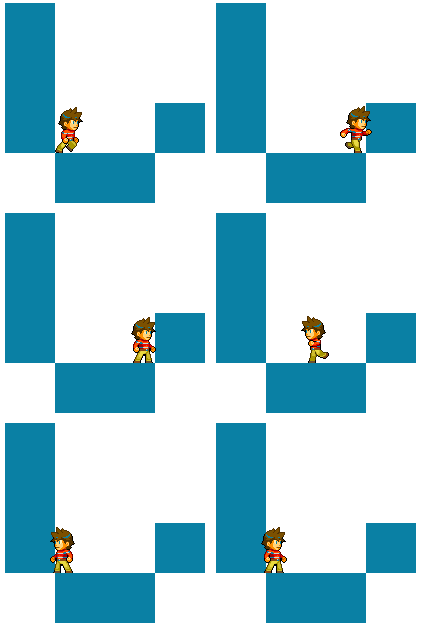
Demonstration of the collision system.
Physics Modification
One of the most exciting aspects of the collision system is how it affects physics. We want to decide what happens to an entity's velocity when it collides with another entity. If a non-static entity collides with a static one (i.e. the player lands on the ground), it's obvious that the player's velocity goes to zero. But what happens when two non-static entities collide?
To simulate the way collisions work in the real world (in a very simple way), we will add two properties to the Physics component: mass and elasticity. Mass is a measure of inertia, which is resistance to a change in velocity. The greater an entity's mass, the harder it is to start if it's not moving and to stop if it's already moving. Elasticity has to do with energy transfer, and can be thought of as how bouncy an entity is. A low elasticity is not very bouncy; an elasticity of 1 is perfectly bouncy. Entities with static-type colliders can be modeled as entities with infinite mass (i.e. can't change velocity at all). Using some physics, we can use these physical properties to determine each entity's new velocity after a collision.
if(overlapX < overlapY)
{
	// Resolve along the x-axis
	colliderPositionA.x -= (overlapX + 0.1) * xdirA;

	if(physicsA != nil)
	{
		if(physicsB != nil)
		{
			// The more elastic entity's elasticity is taken
			double elasticity = MAX([physicsA elasticity], [physicsB elasticity]);

			if(!canMoveB)
			{
				// Model entity B as if it has infinite mass
				double newVelocityA = elasticity * ([physicsB velocity].x - [physicsA velocity].x);
				[physicsA setVelocityX:newVelocityA];
			}
			else
			{
				double newVelocityA = (elasticity * [physicsB mass] * ([physicsB velocity].x - [physicsA velocity].x) + [physicsA mass] * [physicsA velocity].x + [physicsB mass] * [physicsB velocity].x) / ([physicsA mass] + [physicsB mass]);
				double newVelocityB = (elasticity * [physicsA mass] * ([physicsA velocity].x - [physicsB velocity].x) + [physicsA mass] * [physicsA velocity].x + [physicsB mass] * [physicsB velocity].x) / ([physicsA mass] + [physicsB mass]);

				[physicsA setVelocityX:newVelocityA];
				[physicsB setVelocityX:newVelocityB];
			}
		}
		else
			[physicsA setVelocityX:0];
	}
}
Here are some results using the rectangle collision. In my next post, I will describe additional types of collisions.

Completely inelastic.
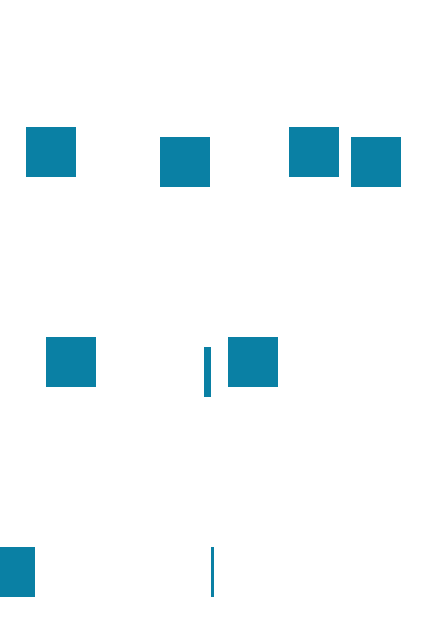
Completely elastic.

Left entity twice as massive.