
March 8, 2014
Frame-Based vs. Time-Based Game Loop
Before we start building, we need to consider how to tackle the game loop. In general, the game loop advances gameplay elements and renders the game world as often as it can. However, there are a number of approaches to the game loop that must be considered first. Specifically, should the game loop be frame-based or time-based?
A single update to the gameplay elements is commonly called a tick or a step. Each time the game is rendered is a frame, and the time between two frames is known as the delta time. The basic approach when building a game is to design game objects to update in discrete steps — for example, the player game object may move 3 pixels along the x-axis each tick.
Simply updating as quickly as possible can cause problems. The delta time for each frame is not always consistent, so if game objects are configured to move in discrete, consistent steps, the game will appear choppy. There are three approaches to resolving this issue.
- Use a variable delta time. Advance everything in partial steps based on delta time rather than in whole steps.
- Set a fixed delta time. Limit rendering to a specific time interval so that game elements can still be stepped discretely.
- Decouple frames and steps. Rather than update and render simultaneously, separate them so that physics can update based on a set time interval and rendering can happen as fast as the device allows.
Each of these options has pros and cons. Using a variable delta time allows both rendering and physics to update as fast as the device can possibly process it. This method, called the time-based method, is based on the idea that the time between any two frames is not going to be consistent, so adjustments need to be made so that game time matches time in the real world. Out of the three options, this one has the best potential for making the game feel smooth, as it can generate more frames on faster devices. The time-based method also ensures that the game runs at the same pace, regardless of the speed of the device on which it is running. A slow device, for example, might need to step 1.5 times more often than a normal device; a fast device might step only 0.7 or 0.8 times.
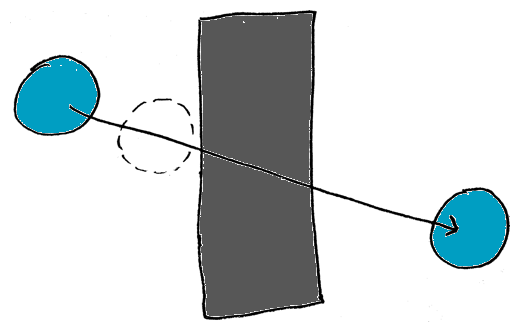
Multiplying by large delta times can cause problems like this.
Allowing any value of delta time can result in all kinds of strange behavior. Consider a fast-moving game object approaching a wall. If the game is running on a slow device, or if rendering hangs up, the delta time will be bigger. If it is big enough, applying delta time can cause the fast-moving object to pass right through the wall. It never actually collided with the wall, it just moved right past it. This issue can be resolved by limiting delta time or implementing a sweeping collision detection algorithm.
Setting a fixed delta time, on the other hand, isn’t prone to the same problems if the physics are carefully planned (terminal velocity, for example, can prevent an object from flying through a sufficiently large wall). Because every step is guaranteed to be the same size, systems of the game are more stable. Other problems arise, however. Game-time no longer matches real-time, and runs faster or slower depending on the speed of the device on which it is running. Spikes in CPU usage can cause the game to slow down, because steps are tied to frames. This close coupling of steps and frames is called the frame-based method.
The last option is to decouple frames and steps, which is a kind of hybrid approach. Steps are allowed to be discrete and are set to a specific time interval, while rendering happens at its own pace. Faster devices can render more often, but don’t speed up game time. Slower devices can’t render as often, but don’t slow down game time (unless the device is extremely slow or steps take longer than rendering). A game loop using this method might look like this:
- (void)update:(NSTimeInterval)deltaTime
{
	processingTime += deltaTime;

	// Step as many times as possible -- save the remainder for later
	while(processingTime >= timePerStep)
	{
		[self update];
		processingTime -= timePerStep;
	}

	[self render];
}
Especially with a small timePerStep, this method is a good option, as it allows faster devices to display all the frames and slower devices to display only what it can, while making game-time match real-time. Physics can be processed in stable increments. The downside to this approach is that every once in a while, the number of updates in a single frame might differ from usual as the remainder adds up, which will cause a jitter. One way to solve this issue is to interpolate between steps when you render. Another is to lock rendering to some multiple of timePerStep — for example, to design the game to run at 60Hz and lock the rendering to 120Hz, 60Hz, or 40Hz depending on the detected capabilities of the device.
So, what’s the best method?
For this engine, I will be going with a strictly frame-based approach. The iPhone already has locked screen rendering to 60 times per second, and has a convenient CADisplayLink method for hooking the game loop directly into the screen rendering cycle. Delta time should be close enough that the difference between frames should be imperceptible, especially considering that this engine is designed for 2D games that shouldn’t be complex enough to slow down the processor. If the engine were going to be 3D and more computationally intensive, I would probably go with some variation of the third option.
Here’s the game loop I’m using for my implementation of the engine. Stepping and rendering happen one-to-one in the active scene.
- (void)update
{
	if(activeScene != nil)
	{
		[activeScene update];
	}
}

- (void)startTheLoop
{
	if(!running)
	{
		running = YES;
		displayLink = [CADisplayLink displayLinkWithTarget:self selector:@selector(update)];
		[displayLink addToRunLoop:[NSRunLoop currentRunLoop] forMode:NSDefaultRunMode];
	}
}